
How to Access Kaiachain data using Kaiascan API
Author. Peter Ayo (Kaia Foundation Developer Advocate)

Author. Peter Ayo (Kaia Foundation Developer Advocate)
Accessing Kaiachain data has never been easier, thanks to the powerful Kaiascan API. This guide walks you through the process of leveraging the Kaiascan API to read on-chain data, offering developers structured access to transactions, wallet balances, smart contracts, token details, and much more.
By the end of this guide, you will:
- Gain a clear understanding of Kaiascan
- Learn how to create a Kaiascan API key
- Explore how to use Kaiascan APIs effectively
Prerequisites
Before diving into the Kaiascan API, ensure you have the following:
- A Kaiascan account
- Node.js installed
- Axios installed for making HTTP requests
Overview
Kaiascan is the leading platform for exploring and searching data on the Kaia network. Beyond its block explorer and related services, Kaiascan offers APIs that enable developers to interact seamlessly with the Kaia blockchain. These APIs also support advanced features like smart contract verification, making them an indispensable tool for developers building on Kaia.
Key Benefits of Using Kaiascan APIs
- Accessing Blockchain Data: By using the APIs, you can easily access historical and real-time blockchain data such as balances, internal or external transactions, events, and more through a standardized interface.
- Verifying Contracts: Kaiascan APIs allow you to verify smart contracts, automating parts of your dApp development workflow and ensuring contract reliability.
- Building dApps: The APIs empower you to build decentralized applications (dApps) on Kaia. For instance, as a developer, you can use the APIs to include essential functionalities in your app, like fetching your contract ABI dynamically instead of hardcoding it for instantiating smart contract calls.
Getting Started with Kaiascan API
In this section, we will create an API Key to access Kaiachain data. Follow these steps to generate your API key:
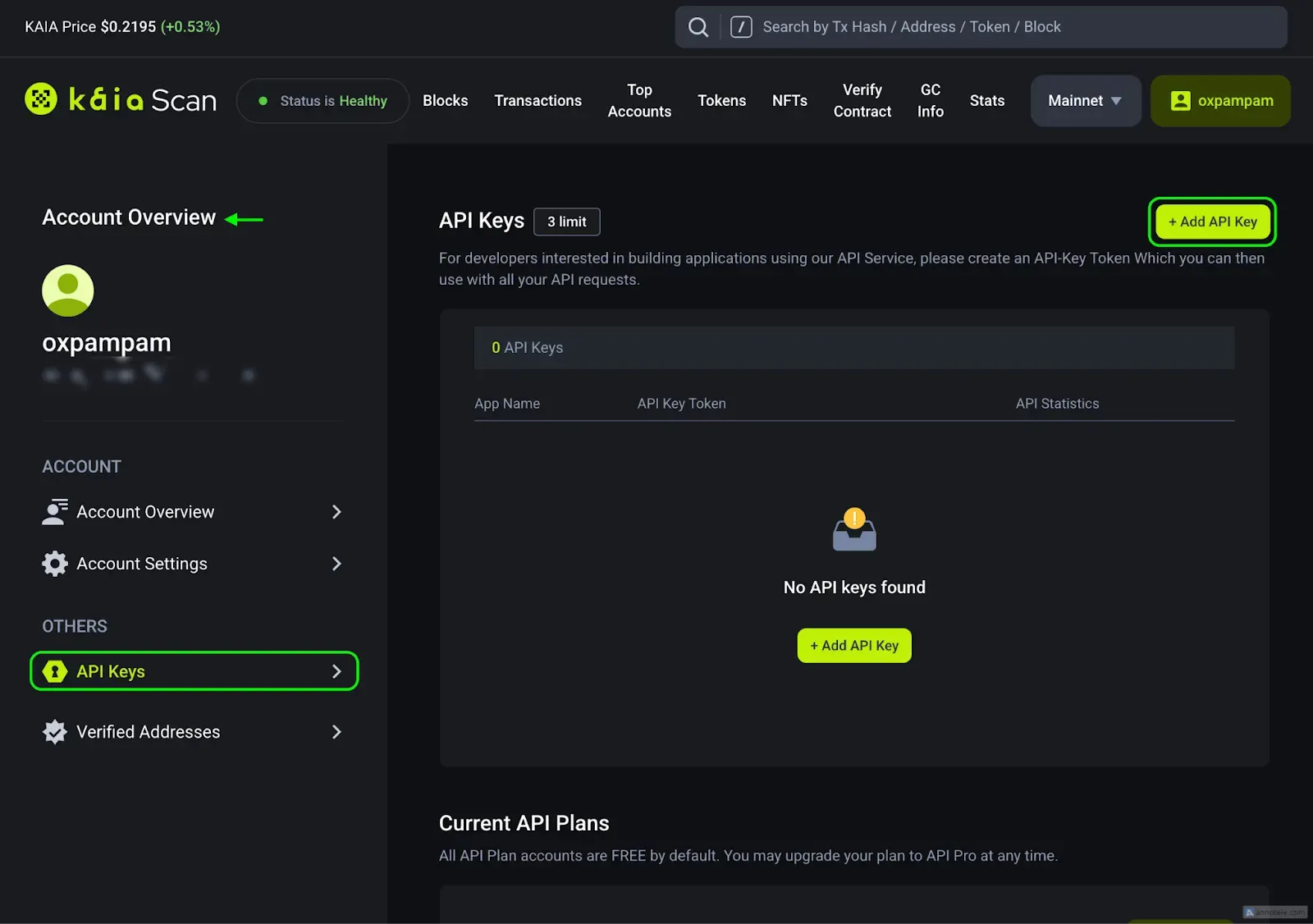
- Navigate to the Account Overview page and select the API Keys tab.
- Click the Add API Key button to generate a new key.
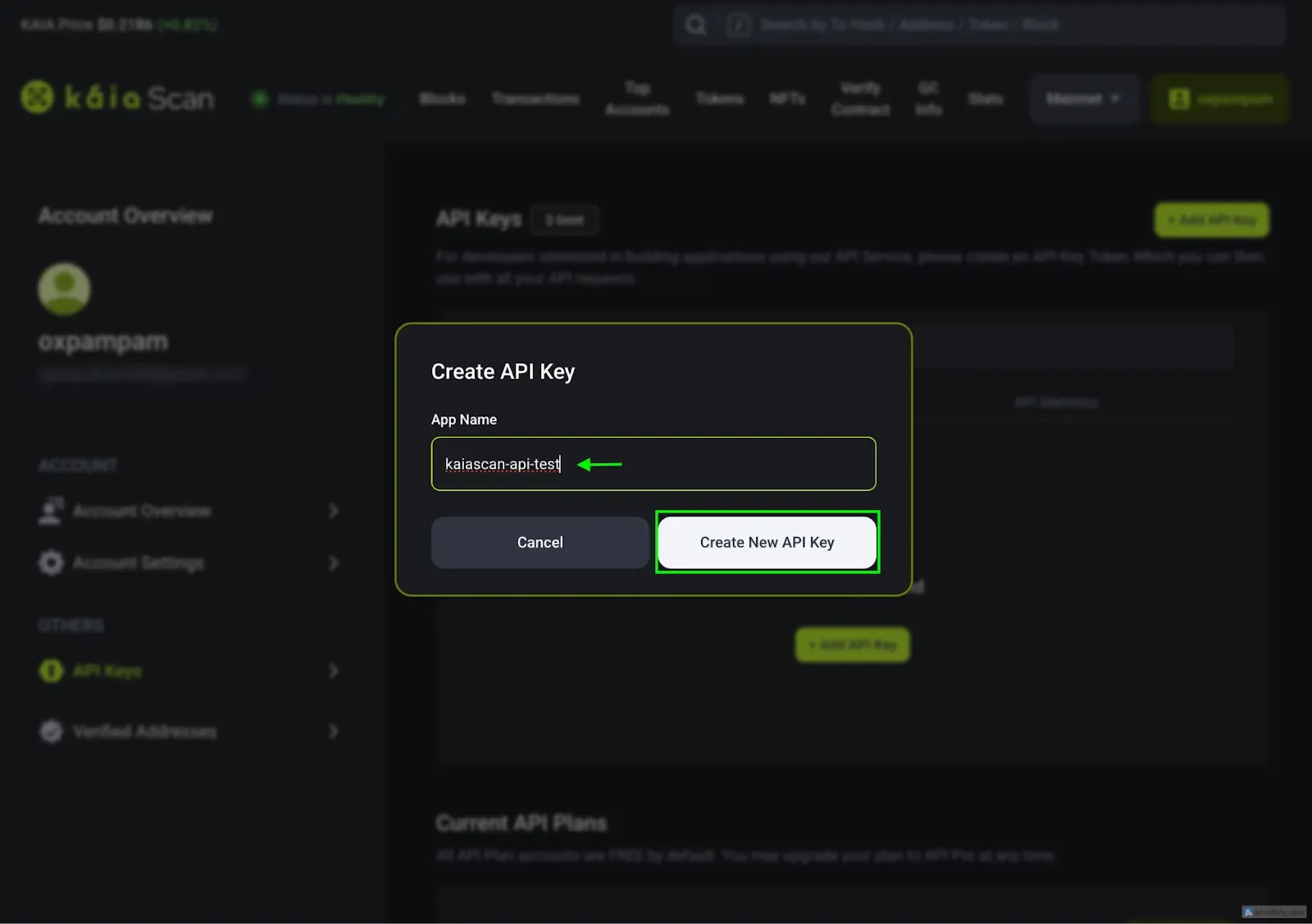
3. Assign a name to your application, and you’ll be ready to use the API Key.
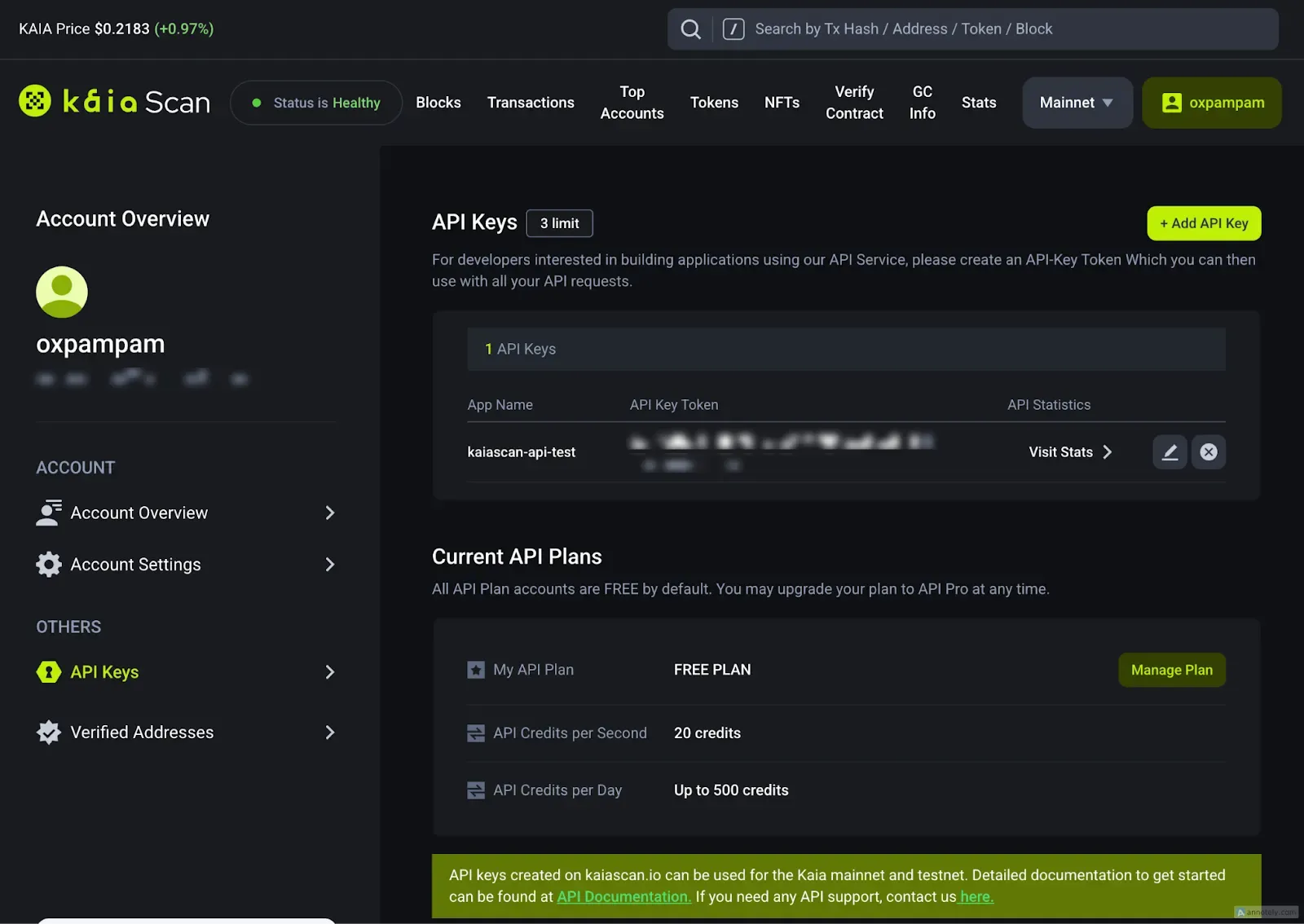
Once created, your API key will appear in your dashboard. Each Kaiascan account can generate up to three keys simultaneously, and these keys can also be used for the Kairos network.
Integrating API Keys Into Your Code
Retrieve ABI of a contract with Kaiascan API
js
require("dotenv").config();
const axios = require("axios");
const API_KEY = process.env.API_KEY;
const CONTRACT_ADDRESS = "0xc6a2ad8cc6e4a7e08fc37cc5954be07d499e7654";
async function getABIofContract() {
  let config = {
    method: "get",
    maxBodyLength: Infinity,
    url: `https://mainnet-oapi.kaiascan.io/api/v1/contracts/${CONTRACT_ADDRESS}/abi`,
    headers: {
      Accept: "*/*",
      Authorization: `Bearer ${API_KEY}`,
    },
  };
  axios
    .request(config)
    .then((response) => {
      console.log(JSON.stringify(response.data));
    })
    .catch((error) => {
      console.log(error);
    });
}
getABIofContract()
Run this command in your terminal
node script.js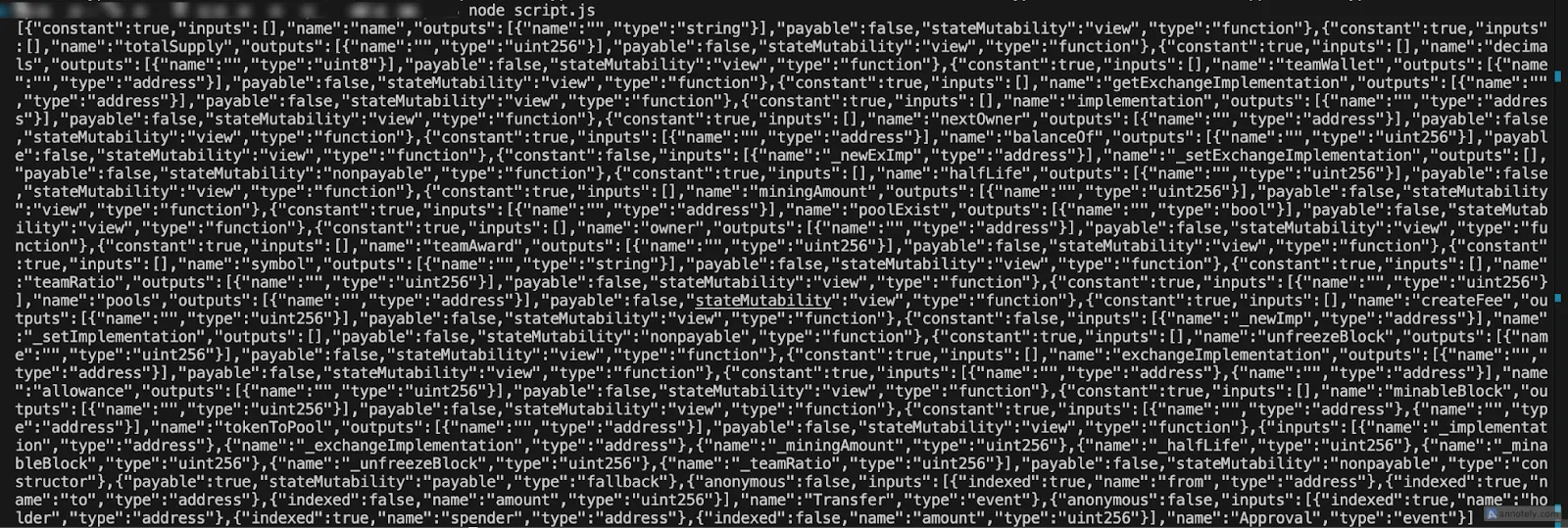
Retrieve a specific block with Kaiascan API
js
require("dotenv").config();
const axios = require("axios");
const API_KEY = process.env.API_KEY;
const BLOCK_NUMBER = "95356998";
async function getBlock() {
  let config = {
    method: "get",
    maxBodyLength: Infinity,
    url: `https://mainnet-oapi.kaiascan.io/api/v1/blocks/${BLOCK_NUMBER}`,
    headers: {
      Accept: "*/*",
      Authorization: `Bearer ${API_KEY}`,
    },
  };
  axios
    .request(config)
    .then((response) => {
      console.log(JSON.stringify(response.data));
    })
    .catch((error) => {
      console.log(error);
    });
}
getBlock()
Run this command in your terminal
node script.js
Get the list of non-fungible token (KIP-17) balances owned by the account
js
require("dotenv").config();
const axios = require("axios");
const API_KEY = process.env.API_KEY;
const ACCOUNT_ADDRESS = "0x1C42aCcd92d491DB8b083Fa953B5E3D9A9E42aD5";
async function getNFTBalances() {
  let config = {
    method: "get",
    maxBodyLength: Infinity,
    url: `https://mainnet-oapi.kaiascan.io/api/v1/accounts/${ACCOUNT_ADDRESS}/nft-balances/kip17`,
    headers: {
      Accept: "*/*",
      Authorization: `Bearer ${API_KEY}`,
    },
  };
  axios
    .request(config)
    .then((response) => {
      console.log(JSON.stringify(response.data));
    })
    .catch((error) => {
      console.log(error);
    });
}
getNFTBalances()
Run this command in your terminal
node script.js
Get a list of fungible token balances owned by the account.
js
require("dotenv").config();
const axios = require("axios");
const API_KEY = process.env.API_KEY;
const ACCOUNT_ADDRESS = "0x1C42aCcd92d491DB8b083Fa953B5E3D9A9E42aD5";
async function getTokenBalances() {
  let config = {
    method: "get",
    maxBodyLength: Infinity,
    url: `https://mainnet-oapi.kaiascan.io/api/v1/accounts/${ACCOUNT_ADDRESS}/token-balances`,
    headers: {
      Accept: "*/*",
      Authorization: `Bearer ${API_KEY}`,
    },
  };
  axios
    .request(config)
    .then((response) => {
      console.log(JSON.stringify(response.data));
    })
    .catch((error) => {
      console.log(error);
    });
}
getTokenBalances()
Run this command in your terminal
node script.js
Retrieve information about a fungible token with Kaiascan API
js
require("dotenv").config();
const axios = require("axios");
const API_KEY = process.env.API_KEY;
const TOKEN_ADDRESS = "0x8888888888885b073f3c81258c27e83db228d5f3"
async function getTokenDetails() {
    let config = {
      method: 'get',
      maxBodyLength: Infinity,
      url: `https://mainnet-oapi.kaiascan.io/api/v1/tokens/${TOKEN_ADDRESS}`,
      headers: {
        'Accept': '*/*',
        'Authorization': `Bearer ${API_KEY}`
      }
    };

    axios.request(config)
    .then((response) => {
      console.log(JSON.stringify(response.data));
    })
    .catch((error) => {
      console.log(error);
    });
}
getTokenDetails()
Run this command in your terminal
node script.js
Exploring Kaiascan API Endpoints
Kaiascan offers several API endpoints depending on the type of information you want to retrieve from the Kaia blockchain. These include:
- Account API: Retrieve account balances and wallet details.
- Transactions API: Access transaction details and histories.
- Contract API: Interact with and verify smart contracts.
- Block API: Fetch block data for specific blocks.
- NFT API: Access non-fungible token data.
- Token API: Retrieve token details and analytics.
For this guide, we tested the API calls using the Free Plan, which allows developers and businesses to explore the core capabilities of Kaiascan without any cost. To access additional endpoints and advanced features, you can upgrade your plan based on your needs, enabling access to richer on-chain data and higher API call limits.
Conclusion
And that’s it! Kaiascan APIs are easy to work with and open up a world of possibilities. With Kaiascan, you can build powerful tools such as token balance trackers, gas optimization tools, wallet activity monitors, and even DeFi dashboards. The API provides a seamless developer experience, allowing you to focus on creating solutions tailored to your needs. Happy coding with Kaiascan APIs!
To learn more about Kaiascan APIs, check out the official documentation.